


Pluto TV | Player Navigation Architecture
Re-architect player controls and navigation to support channel discovery directly within playback, reducing reliance on the full guide.
Focus Areas
Navigation Architecture | In-Player Discovery | Lean-Back Interaction | Session Continuity | Cross-Platform Player System
Scope
Playback Interface | Channel Navigation | Mini-Guide System | Multi-Surface Player Experience
Role
Senior Director, Product Design
Organization
Pluto TV / Paramount
Partners
Product, Engineering, Playback, Design Systems, Competitive Intelligence (CI)
Product Context
Streaming platforms increasingly rely on the video player as a central interaction layer—not just for playback, but for discovery and engagement.
At Pluto TV, the player experience had evolved differently across platforms and devices. Player controls had diverged across device ecosystems—including Fire TV, Apple TV, and Roku—creating inconsistent interaction patterns and making it difficult to introduce new capabilities within playback.
These differences created usability inconsistencies for viewers while increasing complexity for product and engineering teams attempting to scale the experience across platforms.
At the same time, research indicated that viewers increasingly expect to browse channels and explore content recommendations while continuing to watch their current program.
This created an opportunity to unify the player control architecture across platforms while introducing modular interaction layers that could support both Live TV and On Demand viewing behaviors without interrupting the viewing session.
Architectural Alignment
The redesign reframed the player as a system layer supporting multiple viewing behaviors, rather than a simple set of playback controls.
The unified architecture introduced several interaction layers:
Playback Controls
Core controls supporting pause, scrubbing, restart, and primary playback actions.
Mini-Guide
Lightweight channel browsing interface allowing viewers to explore currently playing channels without opening the full Live Guide.
Discovery Tray
Recommendation carousels enabling viewers to browse additional content while continuing playback.
Content Drawer
Expandable panel supporting secondary actions such as audio settings, information panels, and additional player options.
This layered architecture allowed the player to support both passive viewing and active discovery behaviors without disrupting playback.
Player Navigation Architecture

The player was restructured as a layered navigation system, allowing viewers to discover content without leaving playback
A Strategic Example
A key design question was whether discovery should occur inside or outside the player experience.
Most streaming platforms require viewers to exit playback to explore new content. However, research showed that users frequently wanted to browse alternatives while continuing to watch their current program.
Introducing discovery capabilities directly within the player allowed viewers to evaluate other viewing options without losing their place.
Participants reacted positively to this capability, describing it as a more efficient way to explore content while maintaining their viewing context.
This insight informed the introduction of the Discovery Tray and Mini-Guide as complementary browsing tools within playback.
Example Feature: Mini-Guide
The Mini-Guide provided a quick channel browsing experience directly within the player.
Users could scroll through currently airing channels while continuing to watch their current program, with each highlighted channel displaying real-time video previews (Post-MVP due to dual-stream technical limitations) and contextual metadata.
Research showed strong positive reactions to the feature, with viewers praising the ability to browse other channels without interrupting playback.
The Mini-Guide created a faster path for channel switching while preserving the full Live Guide experience for deeper browsing.

Player Experience – Mini-Guide
Product Philosophy & Tradeoffs
The player redesign balanced three core goals:
Simplicity
Maintain a clean interface that prioritizes playback.
Discoverability
Enable browsing and recommendations within the player.
Scalability
Create a modular component system capable of supporting future features.
The final interaction model used layered controls that allowed discovery features to remain accessible without overwhelming the core playback experience.
MVP Scope & Implementation
The initial rollout introduced a unified player architecture across CTV devices, mobile platforms, and web.
Key components included:
Unified Player Control Bar
Standardized playback controls across Fire TV, Apple TV, and Roku to ensure consistent interaction patterns across device ecosystems.
Mini-Guide
Quick channel browsing interface accessible directly from playback on CTV.
Discovery Tray
Recommendation carousels allowing viewers to explore additional content without leaving the CTV player.
Content Drawer
Expandable CTV panel providing access to secondary actions such as information panels, audio settings, and additional playback controls.
Additional viewing features such as End Cards, Skip Intro, and Skip Recap were also introduced to support episodic viewing behaviors.
Organizational Leadership
Delivering a unified player experience required coordination across multiple platform teams and product areas.
My team facilitated cross-functional workshops to audit existing player implementations across devices, benchmark industry approaches, and identify requirements for a unified player architecture.
I helped shape the workshop framework, participated in the sessions, and worked with design, product, and engineering leaders to synthesize the outcomes into a clear direction for the player system.
This alignment established shared principles for how playback controls, discovery mechanisms, and secondary actions should behave across platforms, enabling teams to move forward with a consistent player architecture.
Outcome
The unified player experience improved engagement and usability across platforms.
The redesigned player delivered:
-
12% reduction in bounce rate
-
24% increase in user interaction with player features
User research also indicated that features such as the Mini-Guide and Discovery Tray increased perceived product quality and introduced capabilities not commonly seen in competing streaming platforms.
The initiative established a scalable foundation for future playback and discovery capabilities across the Pluto TV platform.
Leadership Signals
This initiative demonstrates several aspects of product design leadership:
-
Designing system-level interaction models rather than isolated UI features
-
Aligning cross-platform teams around a shared player architecture
-
Unifying device experiences across Fire TV, Apple TV, and Roku ecosystems
-
Introducing discovery capabilities directly into playback to reduce navigation friction
-
Balancing feature expansion with interface simplicity
The resulting player system positioned the video player as a strategic platform layer for future product capabilities.

Unified Player Controls – Live TV Experience
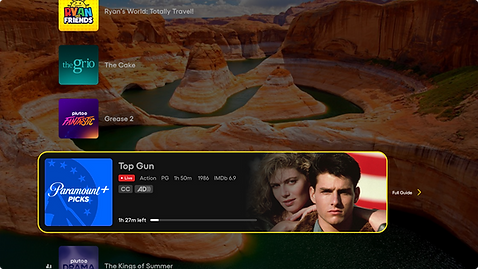
Live TV – Mini-Guide

In-Player Browsing - Discovery Tray

Secondary Features – Side Panel